Traffic Cop 3D: Car Chase
- 4.5
- Rating
- 10.00M
- Installs
- Free
- Price

 Analysis by App-foxy
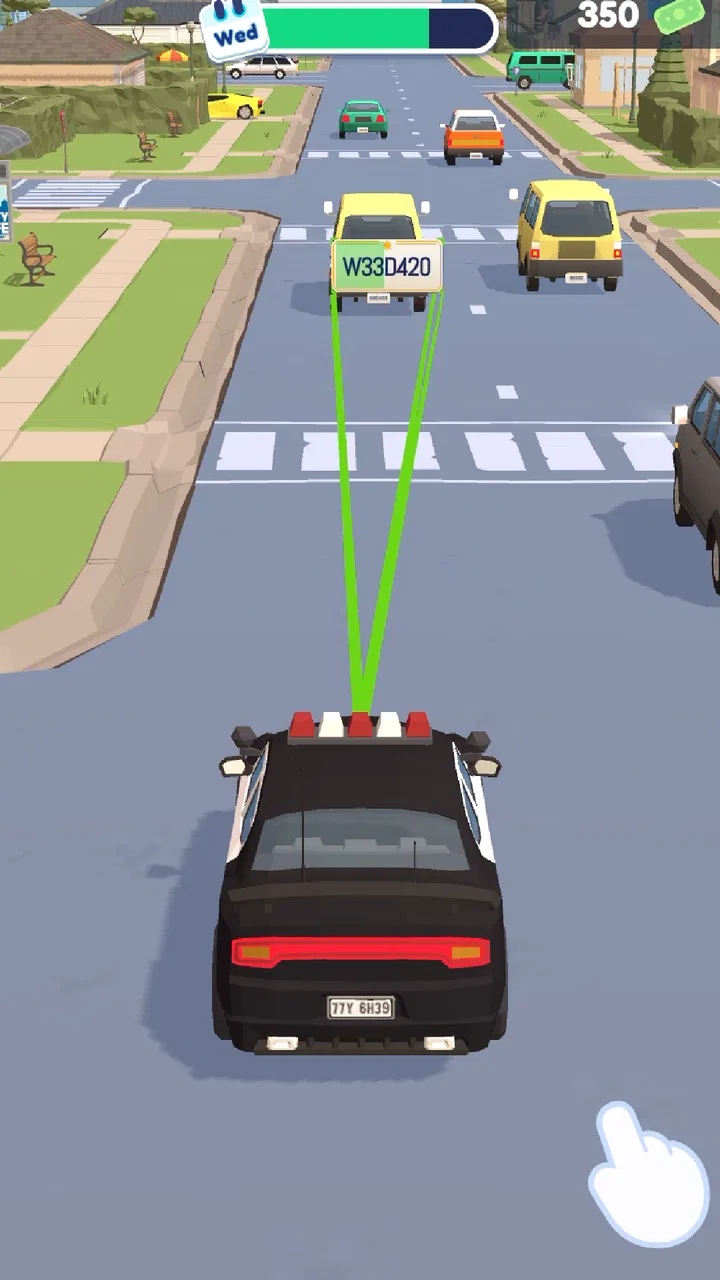
Traffic Cop 3D: Car Chase is the kind of casual game I open when I want something immediate rather than a long campaign or a complicated control system. The idea is easy to understand: I take on the role of a traffic officer, pursue criminals, and try to stop them before they get away. That simple setup makes it approachable, but the real question is whether the short chase format stays enjoyable after the first few sessions.
After spending time with it, I found a game that works best in small bursts. It is quick to pick up, visually clear, and built around a straightforward objective. At the same time, it does not offer the depth I would expect from a full driving simulator or a story-heavy action game. My recommendation depends largely on what you want from a mobile game: if you like brief police-chase scenarios with minimal learning, it is easy to enjoy; if you need detailed driving physics, extensive customization, or a large progression system, you may outgrow it quickly.
Getting started without unnecessary frustration
The first useful thing to understand is that this is a game of immediate decisions, not a traditional racing title. I do not approach each chase as a test of realistic driving technique. Instead, I focus on reading what is happening on the road, reacting quickly, and keeping the pursuit moving. That distinction matters because someone downloading it expecting a serious patrol simulator may find the experience lighter and more arcade-like than anticipated.
You May Also Like

 Blood Strike: 2.5 Anniversary
Blood Strike’s Loadouts Turn Every Drop Into a Tactical Gamble
A close look at Blood Strike’s custom loadouts: how fast access to signature weapons reshapes its battle royale rhythm, rewards preparation, and narrows the gap between fights.

 Pandora - Music & Podcasts
Pandora’s Music Is Easy to Start, but Harder to Recover
Pandora’s strength is its low-effort path from a seed to a station. Its weak spot is how much confidence it asks you to place in connection, setup, and quiet recovery.

 8 Ball Pool
 Is Built on Rivalries, Rematches, and Routine
A close look at the rivalries, rematches, shared routines, and unanswered safety questions that turn a quick pool match into a persistent mobile community.

 Samsung Music
’s Quiet Strength Is Playing What You Already Own
Its reach comes less from spectacle than from dependable access to a personal library. That simplicity is both the app’s strongest retention engine and its ceiling.

 AccuWeather: Weather Radar
AccuWeather Review: A Quick, Clear Forecast for Everyday Decisions
For everyday plans, the best forecast is the one you can understand quickly. AccuWeather makes rain timing, radar, and local conditions easy to act on, with a few trade-offs.

 Hill Climb Racing
Why Hill Climb Racing Still Turns Crashes Into One More Run
A tiny car, a bumpy hill and one more upgrade: Hill Climb Racing keeps resurfacing because its simple chaos makes every near-miss feel personal.
More From Our News Desk



Installation itself should be uncomplicated on compatible Android devices. The game requires Android 7.0 or later, and it is free to download. Before installing, I would still check that the device has enough available storage and that the operating system is supported. Those are basic checks, but they prevent a common mistake: assuming a game will install simply because the phone can run other recent apps.
Once the game is installed, I recommend launching it with a stable connection available, particularly if the app needs to complete an initial setup or load content. If the opening screen takes longer than expected, I would avoid repeatedly tapping buttons. Waiting briefly, closing other demanding apps, and trying again is a better first step than immediately reinstalling everything.
The developer is Kwalee Ltd, and the game has reached over ten million installs. Its average rating is 4.5 from around 243 thousand ratings, which suggests that the basic chase formula appeals to a sizable mobile audience. I would not treat those figures as a guarantee that every player will enjoy it, but they do indicate that this is an established casual release rather than an obscure experiment.
The age guidance is Everyone 10+, so I would consider it suitable for older children and adults who enjoy simple action. Parents should still look at the way the individual player responds to chase and crime themes, especially if the device is shared with younger users. The rating is a useful starting point, not a substitute for personal judgment.
What to check when the first session feels wrong
If the controls seem unresponsive, I first check whether the problem is actually the game. A phone with a busy background process, a nearly full storage area, or an unstable system can make any interactive app feel delayed. I would close unused apps, restart the device, and open the game again before deciding that the controls are broken.
Touchscreen habits can also affect the experience. Fast, repeated taps are easy to misread when a player is trying to correct a mistake. I get better results by making deliberate inputs and watching the vehicle’s position before making another adjustment. This is a small change, but it helps separate a genuine control issue from overcorrection.
Another practical check is the current app version. The current version is 2.1.5, so I would make sure the installed copy is up to date through the normal app store process. If an update has just been installed and the game behaves unusually, restarting the phone is sensible. I would not immediately clear all app data, because that can remove local progress or settings depending on how the game handles them.
Players who use battery-saving modes should also test the game with those restrictions temporarily relaxed. Aggressive power management can interrupt or limit apps while they are running. I cannot promise that changing such a setting will solve every problem, but it is a reasonable diagnostic step when performance changes sharply between normal and low-power use.
How I approach each chase
My most useful adjustment was to stop treating every moment as a race to make the fastest possible move. The goal is to keep control of the pursuit, not simply to react at maximum speed. I watch the road ahead, leave myself room to correct, and avoid making a second input before I can see the result of the first.
This approach is especially useful during a short play session when I am distracted. For example, if I am waiting for a bus or taking a quick break between tasks, I can play one or two rounds without needing to remember a complex storyline. However, that convenience has a trade-off: the game is easy to pause mentally, but it may not provide enough variety for someone planning a long evening of play.
I also recommend using the opening moments of a session as a calibration period. Rather than judging the entire game from the first failed chase, I spend a little time learning how much movement each touch produces and how quickly the vehicle responds. This is one of the simplest ways to reduce avoidable failures without changing any device settings.
The best habit is controlled correction rather than frantic tapping. It makes the chase feel more predictable and helps reveal whether a difficult moment comes from the game’s design or from an input that was too early, too late, or repeated too quickly.
Recovering when a session goes badly
When a chase fails, I do not immediately assume that progress has been damaged. I first return to the normal game screen and try another round. Casual games often make a single failed attempt feel more important than it really is, especially when the action is compressed into a short sequence. A fresh attempt can show whether the problem was a one-off mistake.
If the app freezes, my recovery order is simple: wait a moment, leave the game if the device allows it, reopen it, and restart the phone if the same behavior returns. I would only consider reinstalling after checking that the device meets the Android requirement and that important local progress is not at risk. Reinstallation is a blunt solution, and it should not be the first response to one slow launch.
Network interruptions deserve a separate approach. If a screen fails to load, I would switch between a reliable Wi-Fi connection and mobile data only when that is practical, then retry after confirming that other apps can connect. If other services are also failing, the game may simply be caught in a wider connectivity problem. Repeatedly changing in-game actions will not fix that.
For players who notice lag, lowering general phone workload is more useful than repeatedly restarting the chase. I close video apps, pause large downloads, and let the device cool if it feels hot. Heat and background activity can affect responsiveness even when the game itself has not changed.
Spending, interruptions, and the free model
The game is free, but it includes in-app purchases ranging from $1.99 to $14.49 per item. I would decide in advance whether I want to spend anything, rather than making a purchase simply because a failed attempt feels frustrating. That small rule is particularly helpful in a quick-retry game, where the gap between “one more try” and an unnecessary purchase can be easy to miss.
I also recommend checking the purchase confirmation settings on the device used by a child. The Everyone 10+ rating may make the game feel family-friendly, but paid items still deserve adult oversight. A clear household rule about purchases is more reliable than assuming that a free download will remain entirely cost-free.
The free model is not automatically a problem for me, because it lowers the barrier to trying the game. The trade-off is that interruptions or purchase prompts can change the rhythm of a short session. If you want a completely uninterrupted experience, a paid game with a clearly defined one-time price may suit you better. If you prefer testing a game before committing money, this model is more convenient.
Who will enjoy it, and who should skip it
I think Traffic Cop 3D: Car Chase suits players who want a low-commitment action game. It is a good fit for someone who enjoys police themes, quick objectives, and simple touch interaction without studying a manual. It also works for people who want something they can play in brief gaps during the day.
It is less suitable for players looking for realistic traffic enforcement, detailed vehicle handling, or a deep driving career. A conventional racing game is a better choice if your main interest is lap times, tuning, and track mastery. A driving simulator is preferable if you want authentic road behavior and careful navigation. A story-focused action game will provide more character development and long-term narrative motivation.
The distinction is not a criticism of the game; it is about matching expectations. This is a casual chase experience, not a replacement for every other type of driving game. I enjoyed it more once I accepted that its strength is immediacy rather than realism.
Everyday use and device expectations
A realistic use case is a short waiting period when I do not want to start a game that demands concentration for half an hour. I can open the app, complete a small amount of action, and put the phone away without losing the thread of a complicated plot. That makes it more practical than a large open-world title for quick breaks.
On the other hand, I would avoid starting a chase when I am already dealing with a poor connection, a hot phone, or a crowded background workload. Those conditions make quick reactions harder and can create the false impression that the game is unreliable. The experience is more consistent when the device is reasonably responsive and I have enough attention to watch the road.
Storage and system maintenance are also worth considering. Even when the game itself is not unusually demanding, a phone with very little free space can behave unpredictably during updates or temporary file creation. Keeping some room available and installing updates through the normal store channel is a sensible routine for this title and for mobile games generally.
My practical verdict after using it
Traffic Cop 3D: Car Chase succeeds because it gets to the point. I do not need to learn a large control scheme, follow a long introduction, or commit to a complex progression system before seeing what the game is about. The chase concept is clear, and the casual format makes it easy to return to when I have only a few minutes.
Its limitations are equally clear. Players seeking substantial variety, realistic driving, or a long-term challenge may find the formula narrow. The free structure also means I would pay attention to purchase prompts and avoid letting frustration guide spending. Setup and performance issues should be approached methodically: check Android compatibility, update to version 2.1.5, reduce background load, and test the connection before blaming the game.
For me, the strongest reason to try it is convenience. It gives a recognizable police-chase scenario in a compact mobile format, and its 4.5 average from roughly 243 thousand ratings reflects broad interest in that approach. I would recommend downloading it if you want a free casual game for short sessions and do not require simulation-level driving. I would skip it in favor of a racing or driving simulator if precision, customization, and deeper progression matter more than quick pursuit action.
Overall, I see it as an easygoing pick rather than a game I would build an entire weekend around. Used in the right setting, it is accessible and entertaining. The practical key is to treat it as a short arcade-style chase, keep expectations realistic, and troubleshoot the phone environment before assuming every rough session is caused by the app.
FAQs for Traffic Cop 3D: Car Chase
01What is the main objective of Traffic Cop 3D: Car Chase?
Traffic Cop 3D: Car Chase is a thrilling action game where players take on the role of a traffic cop tasked with maintaining law and order on the streets. Your main objective is to chase down and apprehend speeding or reckless drivers, ensuring the safety of other road users while navigating through challenging city environments.
02How are the controls in Traffic Cop 3D: Car Chase?
The game offers intuitive controls, allowing players to easily maneuver their police vehicle through busy streets. By using simple touch gestures or tilt controls, you can steer, accelerate, and brake as you chase down suspects. The controls are designed to be responsive, providing an immersive and engaging experience for all players.
03What features make Traffic Cop 3D: Car Chase stand out?
Traffic Cop 3D: Car Chase features a variety of exciting elements, including dynamic weather conditions, multiple police vehicles to choose from, and a range of missions that increase in difficulty. The game’s realistic graphics and sound effects add to the immersive experience, while regular updates introduce new challenges and features to keep players engaged.
04Is Traffic Cop 3D: Car Chase suitable for all age groups?
While Traffic Cop 3D: Car Chase is designed with engaging gameplay and vibrant graphics, it is generally suitable for older children and adults due to its depiction of car chases and law enforcement scenarios. Parents are advised to review the game content to ensure it aligns with their expectations for younger players.
05Are there in-app purchases in Traffic Cop 3D: Car Chase?
Yes, Traffic Cop 3D: Car Chase includes in-app purchases that allow players to enhance their gameplay experience. These purchases may include new vehicles, upgrades, and customization options. While the game is free to download and play, spending is optional and players can enjoy the game without making any purchases.
Pros
- Engaging and realistic 3D graphics.
- Simple and intuitive controls.
- Variety of challenging levels.
- Regular updates with new content.
- Offline play available.
Cons
- Occasional in-game ads.
- Limited customization options.
- Requires frequent updates.
- Repetitive gameplay over time.
- Battery drain on older devices.

Traffic Cop 3D: Car Chase
Gallery